
The field update parameters (fieldupdate1 and fieldvalue1) update one or more fields on the Salesforce record when a document is generated. Use them to automate updates after a merge, such as marking a record as processed, changing a status or recording the document version.
Syntax
As Other Parameters on the solution's Assign Behaviors page, one row each:
Parameter Name:  fieldupdate1    Parameter Value: Status
Parameter Name:  fieldvalue1     Parameter Value: Approved
In the solution button's URL (Docs Made Easy adds each Other Parameter to the button URL for you; see Parameters explained):
&fieldupdate1=Status&fieldvalue1=Approved
Values
| Parameter | Value | Effect |
|---|---|---|
fieldupdate1 | The field to update, for example Status | Names the field on the record that changes. |
fieldvalue1 | The value to write, for example Approved | The value the field gets when the document is generated. |
fieldupdate2, fieldvalue2, … | Another field and value | Each fieldupdate parameter is paired with the fieldvalue parameter that has the same number. |
Where to add it
On your solution's Assign Behaviors page, click Other Parameter in the sidebar, then click Add Other Parameter.
Enter
fieldupdate1and the field name in the first row. Click Add Row, enterfieldvalue1and the new value, then click Save.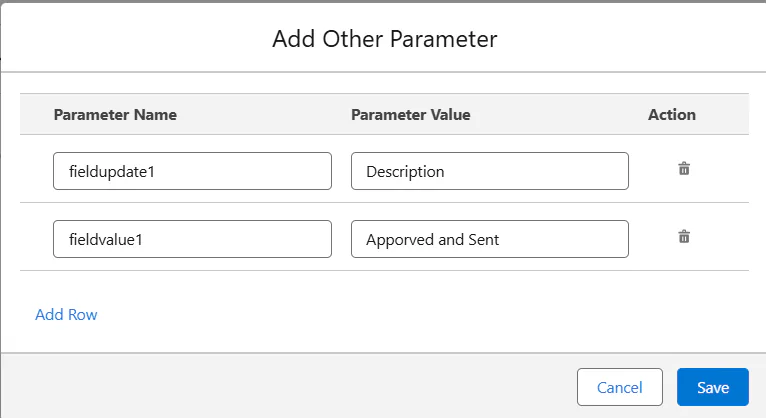
Example
- Input: a record whose Status is
Not Approved. - Parameters:
fieldupdate1=Status,fieldvalue1=Approved. - Output: the document is generated and the record's Status becomes
Approved.
| Syntax | Field value before | Field value after generation |
|---|---|---|
fieldupdate1=Status, fieldvalue1=Approved | Not Approved | Approved |
Works in
The field update is set on the solution, not written in a template, and changes the Salesforce record rather than the document.
Notes
Common errors
- "Salesforce returned an error" when the document is generated. Salesforce rejected the update, for example because of a validation rule or a value the field doesn't accept. Read the text after the error and fix the value. See DME-SF-000.
- "Insufficient access rights". The user can't edit the record or the field. Check record access and field-level security. See DME-SF-004.
- The document generates but the field doesn't change. Check that each
fieldupdatehas afieldvaluewith the same number, then work through the document didn't generate checklist.