
The HTML parameter makes content from a Rich Text Area field appear with its formatting in the generated document. Without it, the document shows raw HTML tags such as <p>, <br> and <b> instead of formatting. The HTML parameter removes unnecessary tags and outputs clean formatting.
Syntax
{{HTML:ObjectName.FieldAPI}}
Values
| Component | Effect |
|---|---|
ObjectName.FieldAPI | The API name of a Rich Text Area field, for example Account.Facts__c. Its content is merged with its formatting. |
Use this parameter only with Rich Text Area fields. Standard text fields and other field types don't need it.
Where to add it
Type the HTML merge field in your Word template where you want the rich text to appear.
Example
| Field value (Rich Text Area) | Syntax | Output |
|---|---|---|
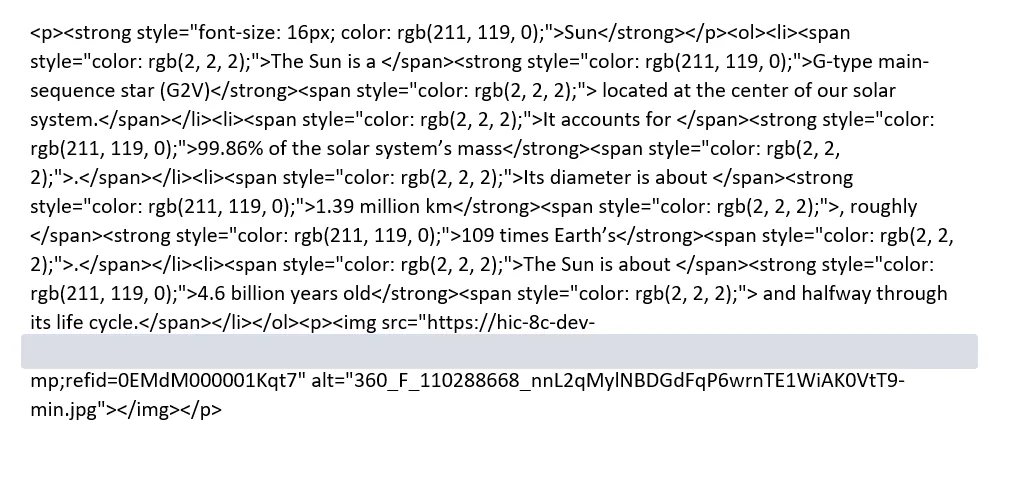
Text with <p>, <br> and <b> formatting | {{Account.Facts__c}} | The text with the raw HTML tags visible |
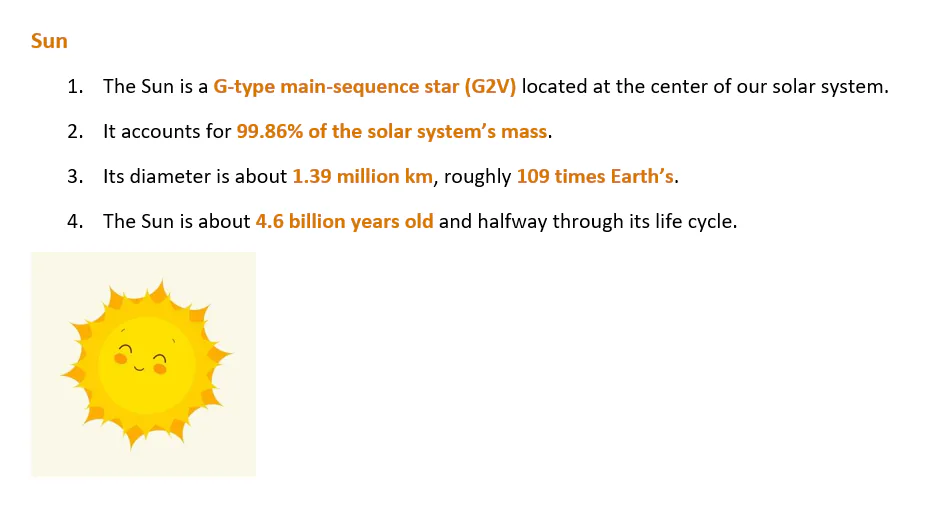
| The same value | {{HTML:Account.Facts__c}} | The text with its formatting applied |
Without the parameter, {{Account.Facts__c}} shows the raw HTML tags:
With the parameter, {{HTML:Account.Facts__c}} shows the formatted text:
Works in
The examples on this page use a Word template. Images inside the Rich Text Area field are shown when you use the HTML parameter.
Common errors
- The document shows
<p>and<br>tags. The field is merged without the parameter. Write it as{{HTML:Object.Field}}. See Merge fields are blank or show their tags. - An error names the field. The field name is wrong or you can't see the field. See DME-SF-002.
- An image in the rich text is missing. Check that the field uses
{{HTML:…}}; rich text images show only with theHTMLparameter. See Images are missing or broken in the generated document.