
The Label parameter shows the label of a picklist value instead of its API value.
By default, Docs Made Easy merges the API value of a picklist field. In many orgs, picklist values have API names that differ from their labels. Use Label when the document should show the label that users see in Salesforce.
Syntax
{{Label:ObjectName.FieldAPI}}
Values
| Component | Effect |
|---|---|
ObjectName.FieldAPI | The API name of a picklist field. The document shows the label of the selected value. |
Without Label: (default) | {{ObjectName.FieldAPI}} merges the picklist's API value. |
Where to add it
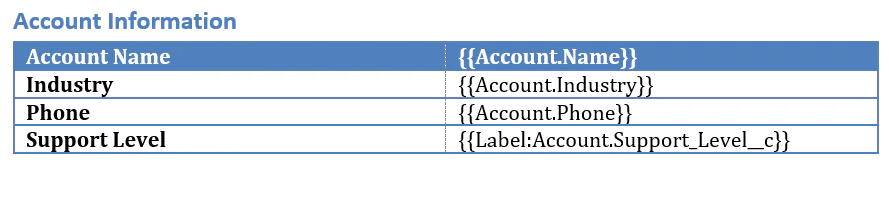
Type the Label merge field in your Word template where you want the picklist label to appear.
Example
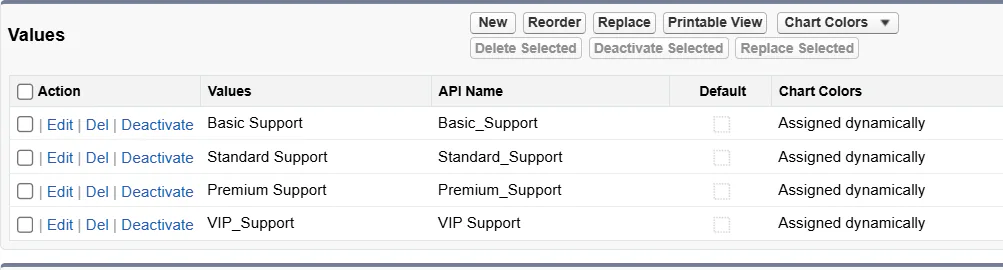
This picklist field has labels that differ from its API values:
| Picklist label | Picklist API value |
|---|---|
| Basic Support | Basic_Support |
| Standard Support | Standard_Support |
| VIP Support | Premium_Support |
| Syntax | Value | Output |
|---|---|---|
{{ObjectName.FieldAPI}} | Premium_Support | Premium_Support |
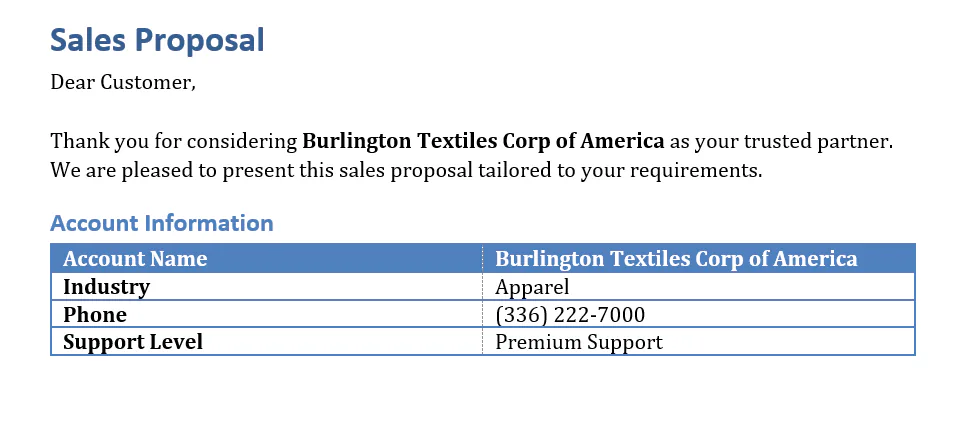
{{Label:ObjectName.FieldAPI}} | Premium_Support | VIP Support |
The picklist values in Salesforce:
The Label merge field in the Word template:
The generated document shows the label:
Works in
The examples on this page use a Word template.
Notes
Labelonly works with picklist fields.- If a picklist value's label and API value are the same, the output is identical with or without
Label.
Common errors
- The document shows
Premium_Supportinstead ofVIP Support. The field is merged withoutLabel:. See Merge fields are blank or show their tags. - An error names the field. The field name is wrong or you can't see the field. See DME-SF-002.