
The NumberCulture parameter controls how numbers are displayed in the generated document, based on a language-region (culture) setting.
It changes the numeral system and applies regional number formatting, such as decimal separators and digit grouping. Unlike currency formatting, it doesn't add a currency symbol. It only changes how the number itself is shown.
Syntax
It has two parts. Define the culture as an Other Parameter on the solution:
Parameter Name:  NumberCulture1
Parameter Value: nl-NL
Docs Made Easy adds each Other Parameter to the solution's button URL (see Parameters explained), where it reads:
&NumberCulture1=nl-NL
Then reference it in a merge field in your template:
{{FieldName \# NumberCulture1}}
Values
| Part | Value | Effect |
|---|---|---|
| Parameter name | NumberCulture1, NumberCulture2 and so on | Names the culture, so the template can reference it. You can use several at the same time. |
| Parameter value | A culture code, for example nl-NL for Dutch (Netherlands). The codes are the same as in the CurrencyCulture table. | Applies that region's decimal separator and digit grouping, without a currency symbol. |
| Template switch | \# NumberCulture1 after a field | Applies that culture to the field. |
Where to add it
On your solution's Assign Behaviors page, click Other Parameter, then click Add Other Parameter. Enter
NumberCulture1and a culture code, then click Save.
In your Word template, add
\# NumberCulture1after the field name, for example{{Opportunity.Amount \# NumberCulture1}}.
Example
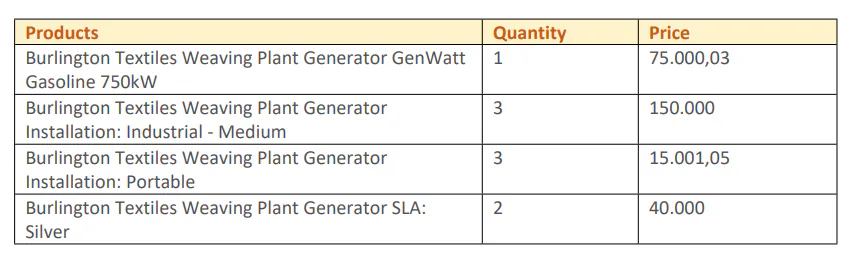
With NumberCulture1=nl-NL (Dutch, Netherlands):
| Actual value | Syntax | Output |
|---|---|---|
| 89000.02 | {{Opportunity.Amount \# NumberCulture1}} | 89.000,02 |
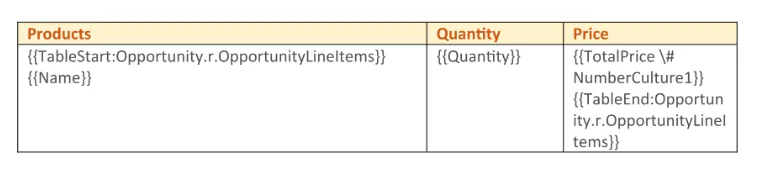
Opportunity line items in the template:
The generated document:
Works in
Word (DOCX) templates: the example on this page is a Word template.
Notes
You can use several NumberCulture parameters at the same time (NumberCulture1, NumberCulture2 and so on) to apply different number formats in different parts of the same document.
Common errors
- The separators are still wrong (
89,000.02instead of89.000,02). Check that the template switch names a culture defined on the solution, letter for letter. See Dates, numbers or currency show the wrong format. - You need a currency symbol as well. NumberCulture never adds one. Use CurrencyCulture instead.
- The line-item table has no rows, or one row. See Related-list tables are empty, show one row or repeat.