
The unlinkFields parameter converts all Microsoft Word field codes in the generated document into static text. Use it when your template contains Word field codes, such as IF conditions or formulas.
When the parameter is on, Docs Made Easy first calculates each field code's final value, then permanently replaces the field code with that text. This keeps the document displaying consistently, especially when it is previewed from a Salesforce record.
Syntax
As an Other Parameter on the solution's Assign Behaviors page:
Parameter Name:  unlinkFields
Parameter Value: 1
In the solution button's URL:
&unlinkFields=1
Values
| Value | Effect |
|---|---|
1 | Calculates every Word field code in the generated document and replaces it with its resulting static text. |
Where to add it
On your solution's Assign Behaviors page, click Other Parameter in the sidebar, then click Add Other Parameter.
Enter
unlinkFieldsin Parameter Name and1in Parameter Value, then click Save.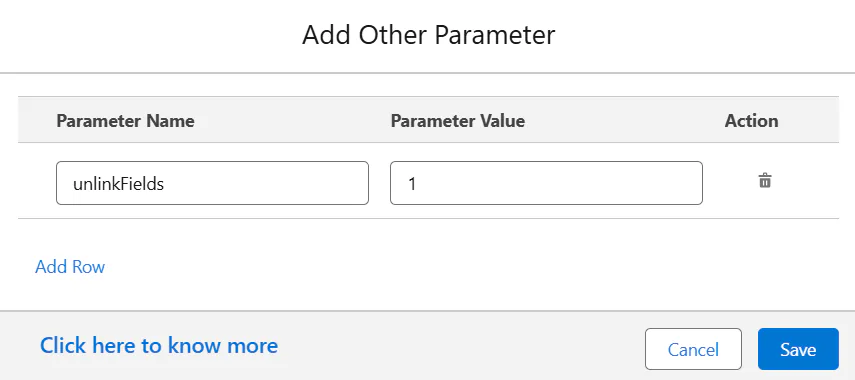
Example
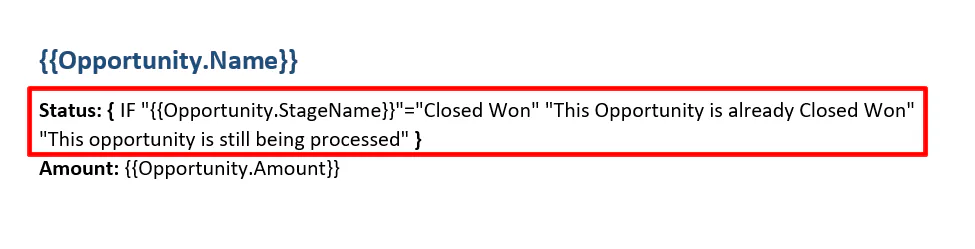
- Input: a Word template with an IF field code that checks the opportunity stage.
- Syntax: the Other Parameter
unlinkFields=1. - Output: in the generated document, the IF field is replaced with its resulting text, which no longer recalculates.
Works in
unlinkFields acts on Microsoft Word field codes, so it applies to Word templates.
Notes
Common errors
- Field code results display inconsistently, especially when the document is previewed from a Salesforce record. Add
unlinkFields=1so the calculated text is stored in the file. - A merge field inside an IF condition is blank or shows its tag. See Merge fields are blank or show their tags.