
The RowNumber parameter numbers the rows of a table automatically when the document is generated. Use it in tables with many records, such as itemized lists, invoices, quotes and data summaries, so readers can refer to entries by number.
Syntax
{{RowNumber}}
Values
RowNumber takes no values. It outputs the number of the current row: 1 for the first merged record, 2 for the next, and so on. The numbers increase with each record that is merged, so the numbering always matches the records in the table.
Where to add it
Put {{RowNumber}} in the first column of the repeating table row in your Word template, after {{TableStart:…}}. This keeps the table layout clear.
Example
An opportunity has three line items.
Template row:
| Item no. | Name | Quantity | Price |
|---|---|---|---|
{{TableStart:Opportunity.r.OpportunityLineItems}}{{RowNumber}} | {{Name}} | {{Quantity}} | {{TotalPrice}}{{TableEnd:Opportunity.r.OpportunityLineItems}} |
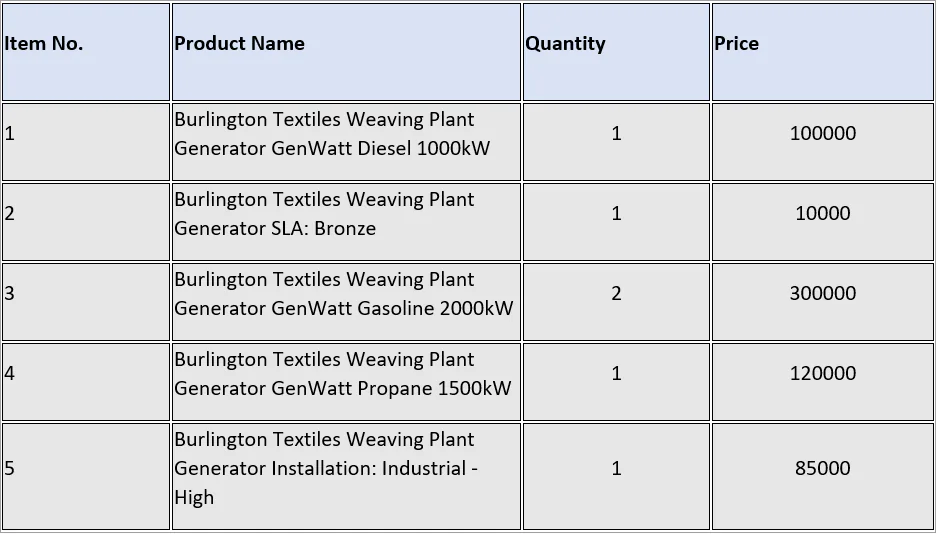
Output: the Item no. column shows 1, 2 and 3, one number per line item.
The generated document numbers each line item:
Works in
RowNumber works inside a TableStart/TableEnd row. The examples on this page use Word (DOCX) templates.
Notes
RowNumber replaces the legacy TableRow syntax. See Use the TableRow parameter (legacy).
Common errors
- The column shows
{{RowNumber}}or nothing. The tag isn't inside the repeating row, or Word split the tag with mixed formatting. See Merge fields are blank or show as {{…}} text. - Only one row, or no rows, are numbered. The table itself isn't repeating. See Related-list tables are empty, show one row or repeat.
- A template syntax error. See DME-TPL-000.