
The RowCount parameter calculates and shows the total number of related records (rows) in a table in your document.
Syntax
{{RowCount:Object.RelationshipName}}
Values
| Component | Effect |
|---|---|
Object.RelationshipName | The child relationship to count, for example Account.r.Contacts. Use the same relationship as the table's TableStart and TableEnd. |
Where to add it
Type the RowCount merge field in your Word template where you want the count to appear, for example below the table.
Example
An account has several contacts.
Template:
| First name | Last name | Department | Phone |
|---|---|---|---|
{{TableStart:Account.r.Contacts}}{{FirstName}} | {{LastName}} | {{Department}} | {{Phone}}{{TableEnd:Account.r.Contacts}} |
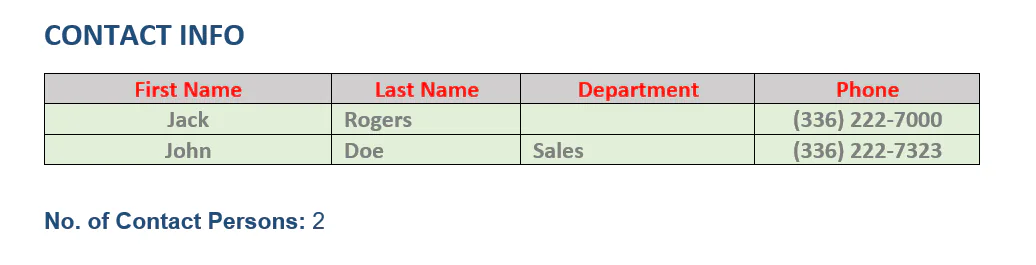
No. of contact persons: {{RowCount:Account.r.Contacts}}
Output: one row per contact, followed by "No. of contact persons:" and the total number of contacts.
The generated document shows the table and the count:
Works in
The example on this page uses a Word (DOCX) template.
Notes
RowCount replaces the legacy TableRow syntax for row totals. See Use the TableRow parameter (legacy).
Common errors
- The count is missing or the tag shows as text. Check the relationship name, or retype a tag Word has split. See Merge fields are blank or show as {{…}} text.
- The table next to the count is empty or shows one row. See Related-list tables are empty, show one row or repeat.
- "sObject type … is not supported". The object in the relationship name is wrong or not readable by your user. See DME-SF-003.