
TableStart and TableEnd repeat a row of a Word table for each related child record. Use them to list line items, opportunities, products, contacts and other records from a Salesforce relationship.
Syntax
{{TableStart:RelationshipName}} ... {{TableEnd:RelationshipName}}
Values
| Component | Effect |
|---|---|
RelationshipName | The child records to repeat the row for. Use either form: the related list (child relationship) form, for example Opportunity.r.OpportunityLineItems or Account.r.Contacts, which fetches all related records; or the alias of a query or Gather Data relationship, for example ContactsAcc or QueryData1, which lets you sort, filter and limit the rows. The Merge Field Helper supports both, and shows a query's alias syntax when the solution has a SOQL query. |
TableStart and TableEnd must use exactly the same name.
Where to add it
In your Word template, put TableStart at the start of the first cell and TableEnd at the end of the last cell of the table row that should repeat. Put the merge fields for each column in between. Keep the header row outside the tags, so it appears once. The safest way to get the names right is to copy the table from the Merge Field Helper.
Example
An opportunity has two line items: Burlington Textiles Weaving Plant Generator GenWatt Diesel 1000kW (quantity 1, price 10000) and Burlington Textiles Weaving Plant Generator SLA: Bronze (quantity 2, price 2000).
Template row:
| Product name | Quantity | Price |
|---|---|---|
{{TableStart:Opportunity.r.OpportunityLineItems}}{{Name}} | {{Quantity}} | {{TotalPrice}}{{TableEnd:Opportunity.r.OpportunityLineItems}} |
Output, one row per line item:
| Product name | Quantity | Price |
|---|---|---|
| Burlington Textiles Weaving Plant Generator GenWatt Diesel 1000kW | 1 | 10000 |
| Burlington Textiles Weaving Plant Generator SLA: Bronze | 2 | 2000 |
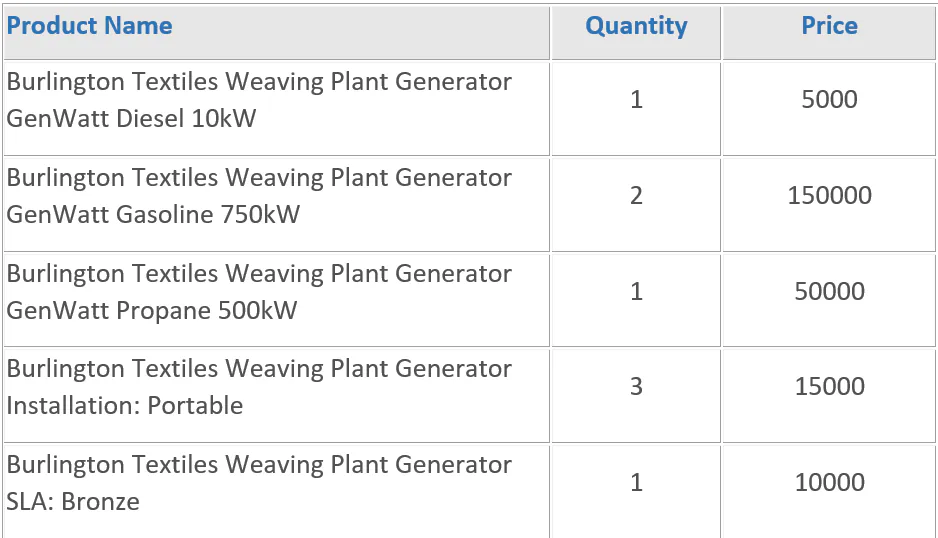
The generated document has one row per line item:
Works in
- Word (DOCX): yes, every example on this page uses a Word table. Word templates support a table inside another table from v1.23.1 (nested tables). Nested tables work only in Word.
- PowerPoint (PPTX): a table inside another table isn't supported. Use separate tables.
- Excel (XLSX): nested tables don't work. Query fields use a different syntax,
&=${{QueryAlias.Field}}. See SOQL query merge fields in Excel.
Common errors
- Header row but no data rows, only one row, or the wrong part repeats. The tags aren't in the first and last cells of the same row, or the names don't match. See Related-list tables are empty, show one row or repeat.
- The document shows
{{Name}}or a blank instead of the value. A child-record field sits outside the table tags, or Word split the tag. See Merge fields are blank or show as {{…}} text. - "Tables inside other tables are not supported in PowerPoint templates". Use separate tables or a Word template. See DME-TPL-000.
- "No such column" or "sObject type … is not supported". A field or object name in the table is wrong or not readable by your user. See DME-SF-002 and DME-SF-003.