
The TableGroup parameter groups related child records in a table by the value of one field. Unlike TableGroupStart, you write it on a single line and it groups by one field only.
Syntax
{{TableGroup:RelationshipName:GroupByField:Show/Hide}}
Values
| Component | Effect |
|---|---|
RelationshipName | The child records to group, for example Opportunity.r.OpportunityLineItems. With a custom SOQL query, use the alias defined in the query instead. |
GroupByField | The field to group by. For a lookup field, use the full API path, for example Product2.Family. |
Show | Displays the group value as a heading above each group. |
Hide | Groups the records without showing the value. |
Where to add it
In your Word template, put the TableGroup tag in the row above the TableStart/TableEnd row of the table.
Example
An opportunity has line items from two product families.
Template:
{{TableGroup:Opportunity.r.OpportunityLineItems:Product2.Family:Show}} | ||
|---|---|---|
{{TableStart:Opportunity.r.OpportunityLineItems}}{{Name}} | {{Quantity}} | {{TotalPrice}}{{TableEnd:Opportunity.r.OpportunityLineItems}} |
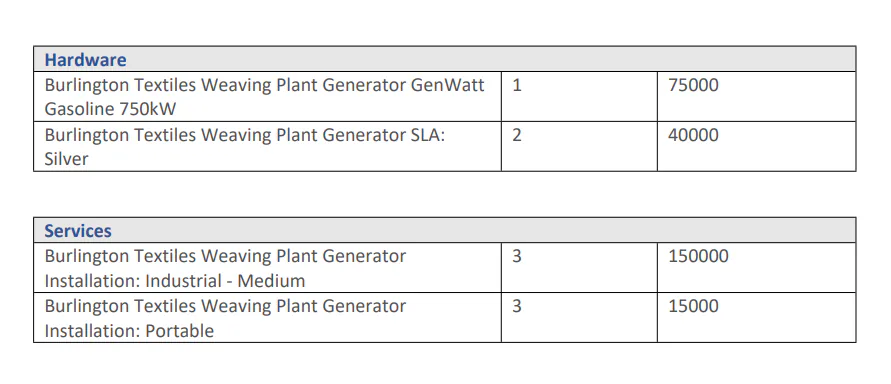
Output: a heading with the first product family, followed by its line items, then a heading with the second family and its line items. With Hide, the line items are grouped by family in the same way, but the family name isn't shown.
The generated document groups the line items by product family:
Works in
The example on this page uses a Word (DOCX) table. TableGroup works only with child relationship objects, or with a custom SOQL query by its alias.
Notes
- You can group by one field only. To group with a separate heading row, use TableGroupStart.
TableGroupworks only with child relationship objects.- Make sure records have a value in the grouping field. Otherwise you may get blank group sections.
- You can also use
TableGroupwith custom SOQL queries. In that case, use the alias defined in the query instead of theObject.r.RelationshipNamenotation.
Common errors
- "Please check the syntax of the table group field: TableGroup:X". The field name or separators aren't written exactly as shown in Syntax. See DME-TPL-000.
- "No such column" on the grouping field. Use the field's API name, with the full path for a lookup such as
Product2.Family. See DME-SF-002. - Blank group sections. Some records have no value in the grouping field. Fill in the field on those records.
- The rows under each group are empty or repeat. See Related-list tables are empty, show one row or repeat.